
Notes

Build logs, ideas, decisions, and things learned while working on mm.

General MM and MLisp improvements

For the past couple of days I've been quite busy. MM is shaping up to be a quite capable editor for my own personal needs.

I've been test driving it daily and didn't have the need to pull up Emacs. The one missing feature is Magit, my all time favourite Git client.

The most work went into decoupling the UI code from the editor primitives. All functionality in the editor is now exposed via MLisp functions so the editor is entirely extensible. I still need to do some cleanup so the builtin keybindings are sane but mm is now fully extensible via MLip!

Upon startup, mm reads all mlisp files in the directory $HOME/.mm/scripts so you have a clean place for your customizations.

I have also been doing some great work on the MLisp side! For a full overview head over to my MLisp site. Here is just a quick overview:

Keyword lookups

You can now do

(:key map)
instead of the more verbose
(get :key map)

Match statement

(def response {:status :err :body "401: Unauthenticated"})
(match response
  ({:status :ok}
    (print "Response OK!"))
  ({:status :err :body body}
    (print (concat "Error in response: " body))))
HTTP requests and JSON parsing in MLisp

Accessing the outside world with MLisp

Today I implemented HTTP requests and JSON parsing in c++ and exposed these via MLisp

A c++ backed implementation for the http request and the json parsing was important for me as I didn't want any bottlenecks in cpu intensive tasks. Sure json parsing is more cpu intensive than network requests but I didn't feel like exposing pure network sockets to MLisp and then building HTTP on top of it in MLisp.

Let's take a look at a sample use of both feature

; HTTP requests and JSON parsing in MLisp
(http/request :get "https://jsonplaceholder.typicode.com/todos/1"
  (fn (response)
    (let ((data (json/parse (get response :body))))
      (message (get data "title")))))

Something that is crucial for me is a self documenting system. I really spent effort on making documentation a first class part of mm.

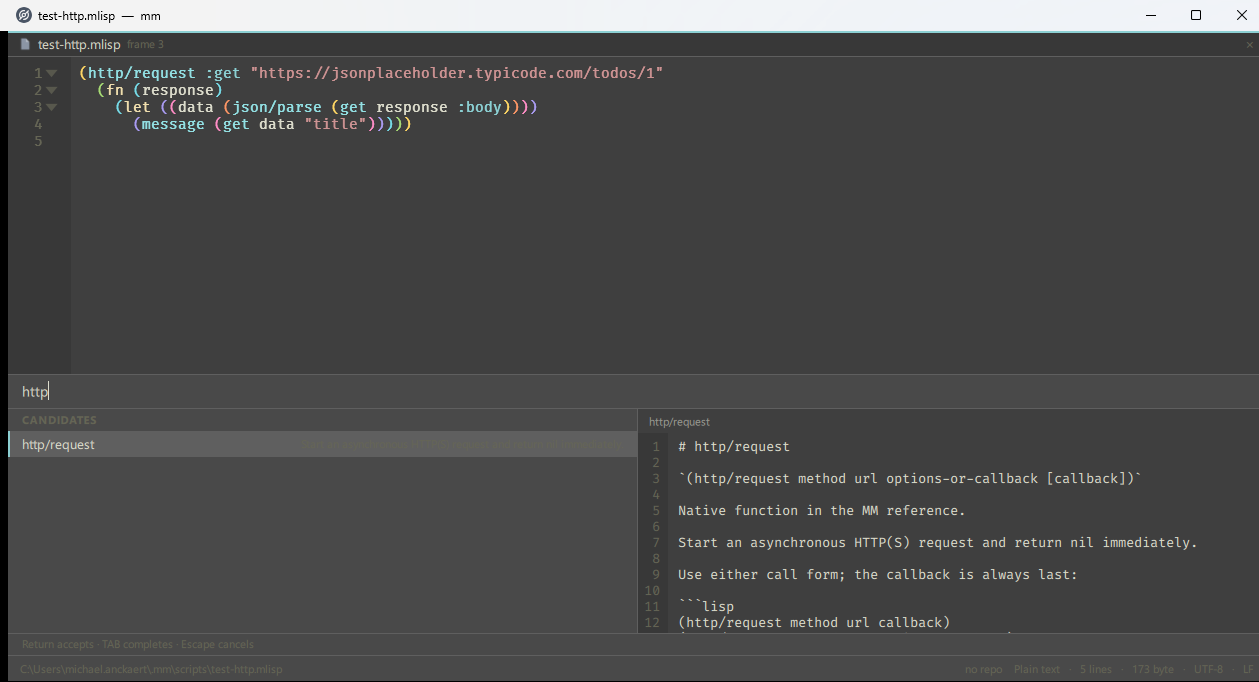
Using the default keybinding C-h f you can access documentation about every MLisp function and mm feature.

Viewing documentation inside MM
Viewing function documention inside mm using C-h f

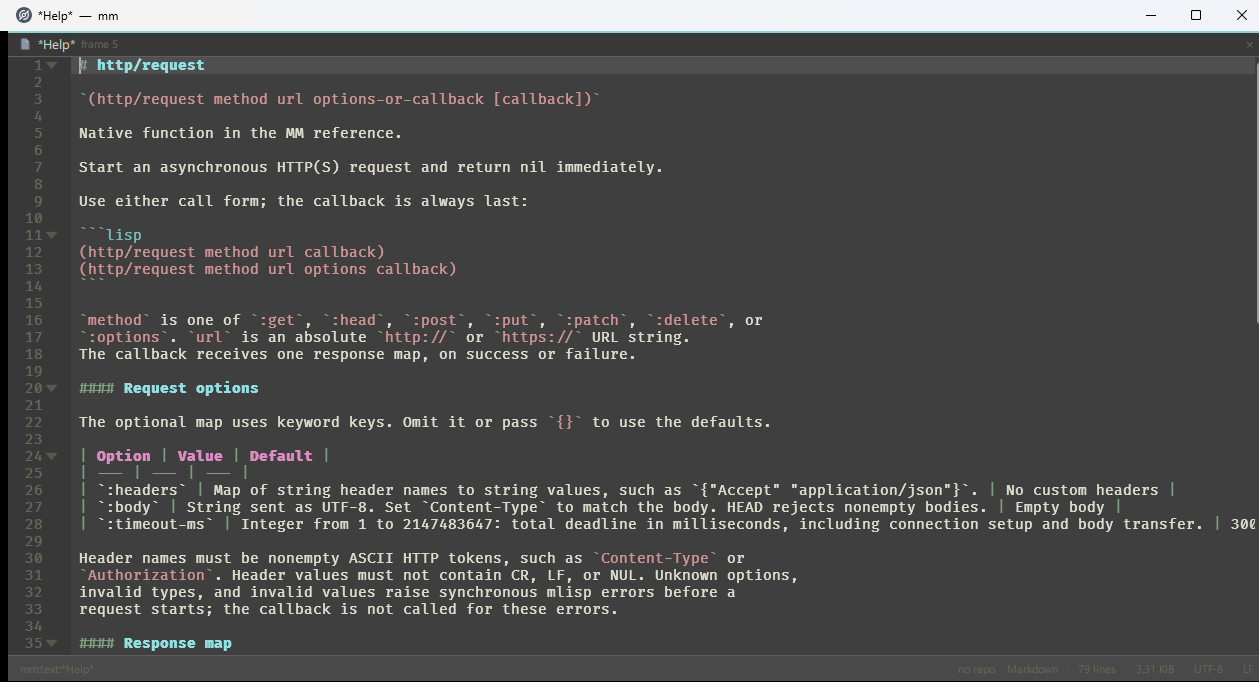
After finding the functions you want press Enter to open the documentation in a separate buffer.

Viewing documentation inside MM
Reading full documentation

One of the things I'd like to pick up today is exploring if I can improve the way documentation is displayed. At the core, documentation is written in markdown. Viewing raw markdown can be pretty difficult so I'll be exploring a rendering mode so viewing docs like the above http/request can be more enjoyable.

Showcasing mm to the world

First public note on my custom editor `mm`.

Hello World! I'd like to introduce you to mm, my Emacs inspired editor.

mm is my Emacs inspired, custom editor that has been living as an idea in my mind for a couple of years. Finally seeing the light of day thanks to liberal use of AI Assisted Development.

Why another Emacs clone?

Because I wanted to build my own custom editor and I got fed up with some (minor) issues I had with Emacs.

Features

mm is an editor with GUI since it's built on the QT framewowrk. I dabbled in pure terminal editors a couple of times (see the Build Your Own Editor page, aka Kilo) but decided I wanted to leverage the awesome work done in QT to make my editor multiplatform easily, have easy access to different layouts on screen and such.

Featurewise mm is a workable editor today. Basic editing features, multiple buffers, frames (window splits) and an extensible core that you can script using MLisp.

If you're into bulleted lists of features:

  • C++ and QT
  • MLisp custom lisp for extending the editor
  • Treesitter for syntax highlighting, code navigation and outlines
  • Git integration

Next

Currently I'm working towards version 0.3.0 which will be a version where the entire core is extensible via MLisp. The features exposed by the core via MLisp are still changing quite a bit so this will be far from a stable release. I'm not really aiming for a stable release at this point since I'm the sole user for the moment.

I mentioned AI Assisted Development in the intro. This will probably turn of some people but that's no issue, like I wrote I'm not looking for users or trying to convert anyone. I'll write more about my use of AI later.

Introducing MLisp

Showcasing the custom lisp I'm using to extend/build mm.

Language notes work best when they introduce one idea at a time and pair the explanation with a small example.

The idea

Creating an Emacs inspired editor screams extensibility. The very first version of mm didn't support scripting, everything was written in c++ and new commands mean more c++ code.

I always had a lisp in my mind as possible candidate for the language behind mm-extensiblity. Some experiments with Lua and Python were done but in the end I sticked with a lisp variant. Why not eLisp you ask? Well despite my affection for Lisp I always disliked the historical warts that had built up over time. Think syntax like #'some-function or functions/constructs with esoterical names like progn, setq or car. Things that once made sense but are now visual distractions, messy syntax, etc.

The idea behind mlisp is something I have explored in the past. It was my own personal lisp dialect that I dabbled with. A first c-backend was written, I used to explore Rust, and so on.

A small example

A wise man once said, Talk is cheap, show me the code, so there is an mlisp sample:

; Some sample mlisp
; Evaluate this buffer in mm, or place it in ~/.mm/scripts.
; C = physical Control, S = Shift, M = Alt/Option. No Command modifier.
(def uppercase-selection
  (fn ()
    "Replace the selected text with uppercase text."
    (editor/replace-selection
      (string/upper (editor/selection-text)))))
(interactive 'uppercase-selection)

(bind-key "C-S-u" 'uppercase-selection)
(bind-key "C-x u" 'uppercase-selection)

Details and limits

Probably the biggest limit of mlisp at the time I'm writing this is the lack of a macro feature and the fact the execution is tied to the UI thread.

There are a number of primitives in the language that are written in C++ and thus are quite fast, still UI blocking is a reality but it's high on my list to fix. Still as it's a hard problem to fix right, this will probably take some time.